From your guest list to print-ready files
Everything happens here, without an account or a call. Most of the time goes into checking your list; making the files takes seconds.
- You bring
- A list of names, each with the table you chose
- You get
- Chart, place cards, table numbers, QR sign, guest page and backup list
- Price
- $39 up to 250 guests, $59 up to 500, after a free preview
- Changes
- Free until your event; every file updates
-
Name Table Amélie Papadopoulos 1 Siobhán Ní Bhriain 2 Mateo Núñez Garden Priya Raman Garden Hugo Bergström 3 Get your list ready
You need one row per guest with two things: the name as it should be printed, and the table you've assigned. Tables can be numbers or names. Separate first-name and last-name columns are fine too.
Starting from scratch? Use the free guest-list template (CSV or Excel).
-
Upload it
Upload a CSV or Excel (.xlsx) file, or paste straight from a spreadsheet. Then confirm which column holds names and which holds tables. You'll see the first rows as we read them.
Only names and tables are kept. Any other columns, like addresses or meal choices, are discarded as soon as you confirm the columns. Up to 500 guests per event.
-
2 guests have no tableAdd a table or leave them off the chart.Possible duplicate“Sam Patel” appears twice. Keep both or remove one?Long names will fitSet a little smaller, never cut.
Check what we found
Before anything is designed, the list is checked:
- Missing tables: you assign them before you can continue.
- Possible duplicates: two rows with the same name. You decide whether to remove one or keep both, for example for a parent and child with the same name. Nothing is merged automatically.
- Very long names that may not fit on a place card.
- Unusual characters a design's font can't draw, so nothing is silently dropped.
You can also edit, add or remove guests here.
-
Choose a design and sizes
Pick one of the eight designs (see the samples), then:
- chart size: 16 × 20 in, 18 × 24 in, 24 × 36 in, A2 (420 × 594 mm), A1 (594 × 841 mm) (size guide)
- main layout: grouped by table or alphabetical (you get both files; which to use)
- sort by first or last name
- paper: US Letter or A4, for place cards, table number cards, the QR sign and the backup list
- the names for the top, your date, and an optional venue
-
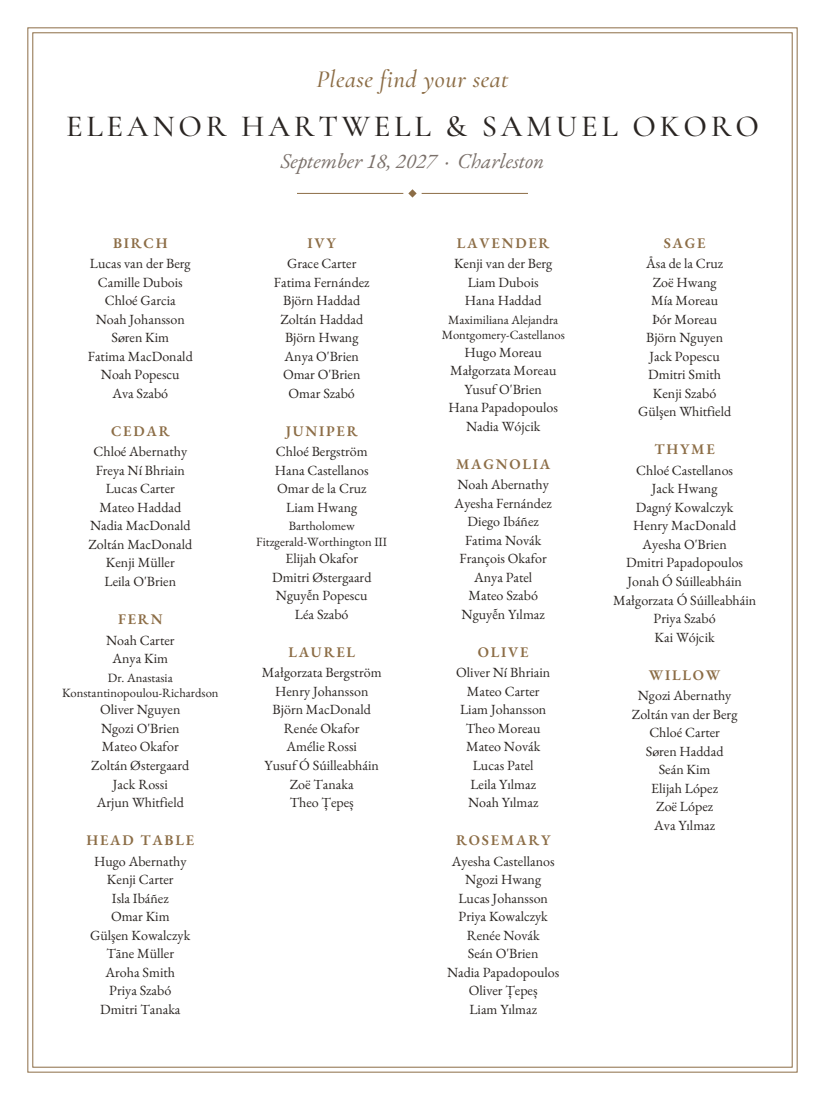
Preview with your names, free
You see your whole chart, a finished place card, the QR sign and the table numbers with your own guest list. Previews are watermarked images at screen resolution, so they can't be printed, and the preview QR code doesn't scan.
-
Pay once
$39 for up to 250 guests, or $59 for a large event of 251–500 guests. The price is set from your guest count and shown before you pay.
Checkout is hosted by Stripe; we never see your card details. You'll be asked to agree to the terms, including that files are delivered immediately. Your files unlock once Stripe confirms the payment, usually within a few seconds.
-
Download your files
Your private dashboard has every file, separately or as one .zip:
- seating chart in your main layout, plus the other layout
- place cards, with a printing and folding guide on page 1
- QR "find your seat" sign
- table number cards, one per table
- backup guest list for the welcome table
The dashboard also shows your private management link. Save it: it's how you get back in from another device. If you lose it, you can have a one-time sign-in link sent to your checkout email from the sign-in page.
Print at 100% ("Actual size"). The seating chart is sized for poster printing at a print shop; place cards and the sign print on a home printer.
-
Make corrections until your event
Fix a spelling, move someone to another table, add or remove a guest, or change the design or size. Every file regenerates to match, and the QR guest page updates immediately. There's no limit on corrections. Anything you've already printed needs reprinting.
-
On the day, and afterwards
Guests scan the QR sign, type their full name and see their table (how the QR page works). The guest page stays online until 30 days after your event date. Then it and your guest list are deleted automatically. You can delete everything sooner from your dashboard.
If you don't pay, your draft is deleted after 14 days of inactivity.

More questions? See the FAQ.